
Expert InsightNetwork & Security
When Broadband Fails: Is Backup Internet Worth It?
A second connection can keep essential work moving when your main broadband fails. The right plan considers coverage, automatic switching, power and the applications you actually need—not just another router.
Decide what needs to stay connected
A broadband outage can interrupt cloud software, calls, bookings and card payments even when your local Wi-Fi is still working. For a home office it may mean missing a meeting; for a small business it can stop important work. Start by identifying which services matter and how long you could reasonably manage without them.
Not every site needs an expensive second circuit. A mobile backup may be enough for essential traffic at one location, while a business with substantial dependency may need greater capacity and stronger independence. The right budget follows the cost and inconvenience of downtime.
This is a different question from whether smart-home devices can work locally. Backup internet aims to restore the outside connection; local automation and manual controls remain useful even when every internet path is unavailable.
Protect the work that matters
Decide what needs to stay connected
- EssentialPayments, business calls and priority cloud tools.
- UsefulNormal browsing and routine collaboration.
- Can waitGuest streaming, bulk updates and large backups.
Choose a genuinely useful second route
4G or 5G can provide a practical alternative to a fixed broadband line where reception and capacity are suitable. Test the actual location and expected busy periods. A fast speed test once does not establish reliable service throughout the day.
A second fixed connection may offer more predictable capacity, but two retail providers can share the same cable route or upstream infrastructure. Satellite is another possible option where installation, sky visibility, power requirements and ongoing costs suit the site.
Compare independence as well as speed. Mobile networks can become congested or lose power during the same storm that affects fibre. Check allowances, recurring charges and installation requirements before assuming a backup will solve every outage.
Three routes to compare
Choose a genuinely useful second route
Let the network switch connections
On suitable UniFi gateways, WAN failover monitors connectivity and switches to a configured backup when the primary connection is judged unavailable. The system can return to the primary connection after recovery. The precise setup depends on the gateway, ports, firmware and backup equipment.
Failure detection should test useful reachability rather than rely solely on whether a cable is plugged in. The checks and timing need to suit the site, including what should happen when the main connection is unstable rather than completely down.
Switching WAN connections can change the public IP address. Calls, VPNs or other active sessions may need to reconnect, so automatic failover is not a promise of interruption-free sessions. Load balancing is different: spreading connections across links does not automatically combine them into one faster download.
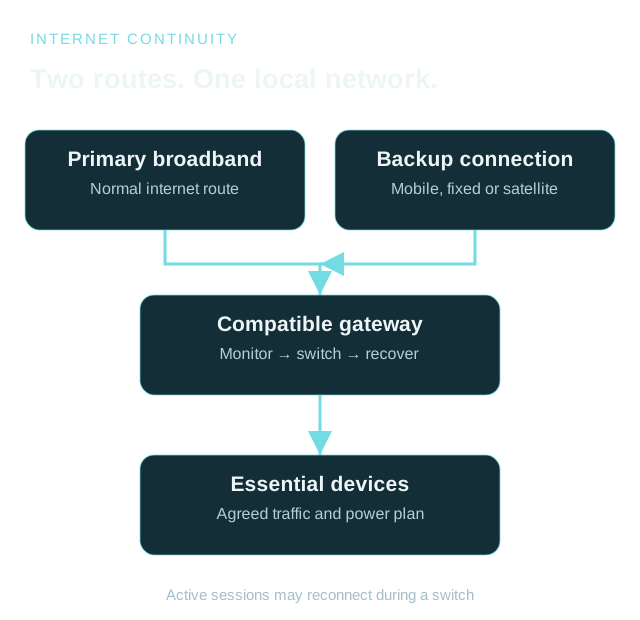
A second path when the first fails
Let the network switch connections
- Normal operationPrimary broadband carries the agreed traffic.
- Failure detectedGateway checks trigger the configured backup.
- RecoveryReturn to the primary and verify important services.
Power belongs in the backup plan
A cellular connection is little help if the gateway has no power. Depending on the design, a power plan may need to cover the fibre ONT or modem, router, relevant switch, access point and backup modem. Size a UPS around the actual load and required runtime.
ComReg’s October 2026 severe-weather advice makes an important distinction: battery backup can keep your equipment operating only while the relevant upstream broadband infrastructure also remains available. A UPS protects against a local power interruption; it cannot power an exchange or mobile mast.
Plan equipment placement, ventilation and cable routing properly. Check batteries and test runtime periodically rather than treating an installed UPS as permanent proof of resilience. A failed shared router or switch can still affect both internet paths.
Follow the whole powered path
Power belongs in the backup plan
Give essential traffic room to work
A backup link may have less capacity or a limited data allowance. Where the chosen equipment supports it, define which networks or traffic can use backup and which should pause. Guest streaming and large cloud backups should not crowd out the work the connection was installed to protect.
Test the real applications, including card terminals, business calling and remote access where relevant. Confirm that their providers permit and support the alternative connection. Do not infer application readiness from a successful browser speed test.
A useful acceptance test deliberately disconnects the primary service during an agreed window, checks failover and essential applications, then restores it and checks recovery. Record what interrupted, what recovered and whether any manual action was needed.
Test failure and recovery
Give essential traffic room to work
- DisconnectSimulate the agreed primary-link failure.
- CheckUse the essential applications on backup.
- RestoreConfirm recovery and record remaining limitations.
Coverage and continuity solve different problems
Better Wi-Fi fixes how devices connect around your premises. Backup internet addresses the connection from those premises to the outside world. A site may need one, both or neither; surveying the problem first avoids buying the wrong solution.
Our Whole Home Wi-Fi package provides three UniFi Express 7 units, supplied, installed and configured for €999 under the published terms. It is a local coverage offer, not an included backup-internet subscription or a guarantee of failover capability. Additional units for larger homes can be requested and quoted separately as described on the offer page.
MBS Integrations can assess available connections, equipment compatibility, power and essential traffic as a separate continuity project. Explore Network & Security or tell us what stops when your broadband goes down.
Start with the actual problem
Coverage and continuity solve different problems
- CoverageCan devices connect reliably around the building?
- ContinuityIs there a usable alternative when broadband fails?
- A practical planAgree equipment, subscriptions, scope and testing.
Sources & Further Reading
References checked 4 November 2026. Features, tariffs and service availability can change.
Planning something similar?
Tell us what you already have and what you would like to improve. We will help plan the next practical step.
Discuss Your Project