Expert InsightNetwork & Security
Do You Really Need Cat6 Everywhere?
A few well-planned cable runs can support a much more capable wireless network. Discover where wired access points and UniFi Wi-Fi 7 make sense—and which devices still deserve an Ethernet connection.

Cable the backbone, not automatically every device
A larger home or busy office does not automatically need a data socket for every laptop or tablet. Good Wi-Fi can support everyday cloud applications, streaming and video meetings, provided coverage and capacity are designed around the people using them.
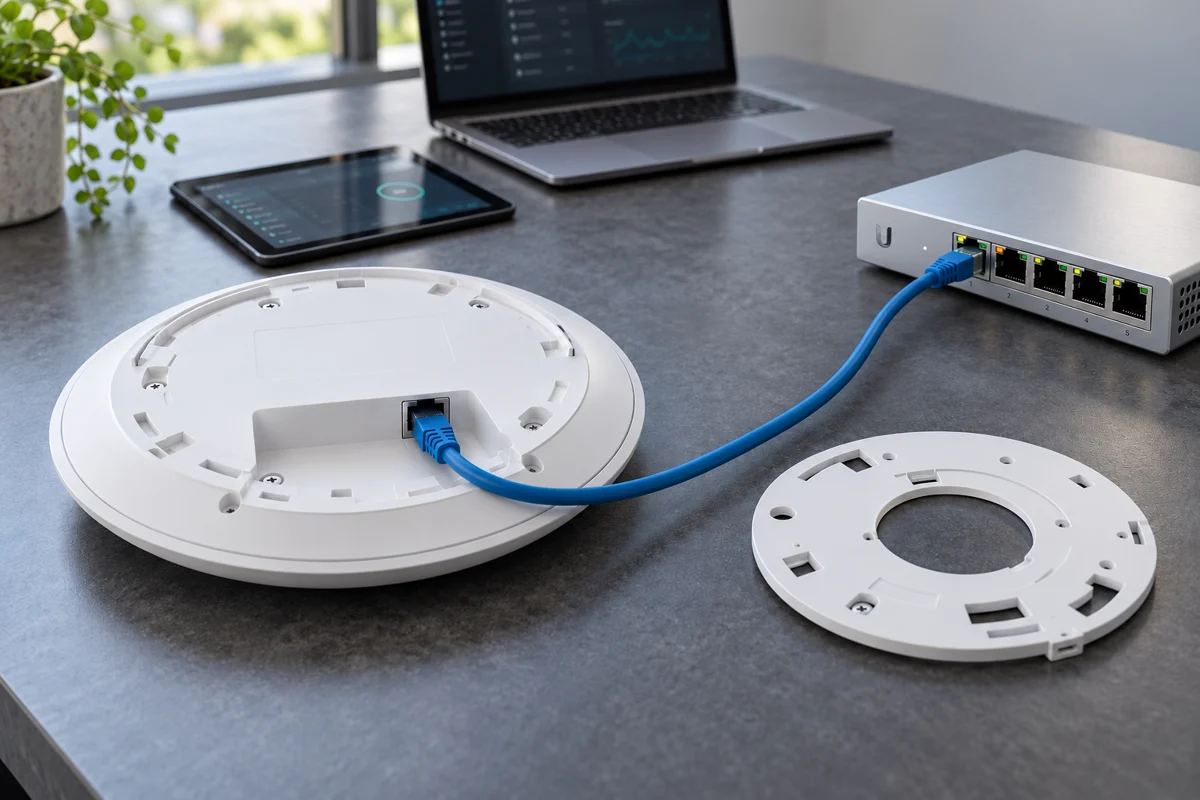
The useful distinction is between connecting clients wirelessly and connecting the access points themselves wirelessly. A wired access point receives its network connection over Ethernet, then serves nearby devices over Wi-Fi. Often, a few well-positioned cable runs to those access points deliver more value than wiring every room or desk.
A practical hybrid
Wired foundation. Wireless flexibility.
- Router + switchThe connection to the internet and wired network.
- Ethernet to access pointsA dependable backhaul; PoE where supported.
- Wi-Fi to devicesLaptops, phones, tablets and everyday applications.
Where wireless is enough—and where a cable earns its place
Phones, tablets and moving laptops are natural Wi-Fi clients. Ordinary office work and meetings can also work well on a properly designed wireless network. What matters is simultaneous demand: a room full of calls and large downloads needs more consideration than the same number of mostly idle devices.
Keep Ethernet in mind for access-point uplinks, NAS devices, servers, PoE cameras and workstations moving large files all day. For critical fixed equipment, predictable latency and freedom from radio interference can matter more than convenience. A resilient business service may also need backup power or redundant connectivity; a cable alone is not a continuity plan.
Choose by workload
Use each connection where it helps
- Usually wirelessMobile clients and ordinary office or home use.
- Prioritise EthernetAPs, NAS, servers and sustained heavy transfers.
- Assess individuallyCritical equipment and dense meeting spaces.
Why hard-wired access points make a difference
Wireless mesh can be a useful option when cable routes are difficult. However, traffic between mesh units also uses radio resources. Signal quality, interference and additional hops can affect capacity. Connecting access points by Ethernet removes that wireless backhaul link from the equation.
A suitable PoE switch can deliver both data and power to compatible access points, simplifying placement. Check the AP’s power standard, the switch’s total power budget and the required uplink speed. Reuse sound existing cabling where it meets the design; new Cat6 or Cat6A runs should be chosen for the route and performance required, not installed automatically everywhere.
What UniFi Wi-Fi 7 can genuinely add
With suitable clients and a good radio environment, UniFi Wi-Fi 7 can offer substantial wireless capacity and responsive everyday use. Supported models provide access to 6 GHz, while Multi-Link Operation can help compatible clients use multiple links for better performance or stability. Benefits depend on the AP, client, firmware and configuration; older devices do not gain every new feature.
For example, the U7 Pro XG combines tri-band Wi-Fi 7 with a 10 GbE uplink and PoE+. Its advertised radio rates are not guaranteed download speeds: usable throughput is lower and traffic to the wired network is constrained by the uplink and the rest of the path. Wider channels are not always the best choice in a busy multi-AP building. U7 Pro XG specifications · UniFi MLO guidance.
Look beyond the headline
Performance follows the whole path
- Compatible clientRadio features, antennas and software matter.
- Well-designed Wi-FiPlacement, interference and channel plan.
- Adequate uplinkSwitch, server and broadband can set the limit.
Reliability comes from the design and the test
Thick stone walls, concrete floors and awkward extensions still affect radio signals. A Wi-Fi 7 label cannot remove those obstacles. We would assess the building, working areas and expected load, then plan access-point locations, channels and separate guest or smart-device access where appropriate.
Commissioning should include calls while moving around, simultaneous use, latency or packet loss and relevant file transfers—not just a speed test beside one AP. Use the correct country settings and approved equipment; 6 GHz availability and operating rules vary by region. UniFi management helps with visibility and adjustments, but reliable results still need an installation suited to the site.
Test where it is used
Measure everyday performance
- Occupied roomsCheck coverage at desks and living spaces.
- Concurrent activityRun representative calls and transfers together.
- Movement + stabilityCheck roaming, latency and packet loss.
Start with a survey, then choose the right amount of wiring
For many homes and smaller businesses, the sensible answer is a hybrid: wire the backbone and demanding fixed devices, then use Wi-Fi for most everyday connections. Larger or busier premises may need more APs and a stronger wired core. The right scope follows the building and workload.
For home coverage, our whole-home Wi-Fi package is a practical starting point: three UniFi Express 7 units supplied, installed and configured for €999, subject to property assessment and agreed scope. It is a different package from the U7 Pro XG example above. New cabling, PoE switching or more complex requirements are assessed and quoted separately; no fixed speed or universal coverage is promised.
Plan before rewiring
A practical next step
- AssessBuilding layout, existing wiring and busiest use.
- DesignSelect the APs, backhaul and wired priorities.
- AgreeConfirm installation scope and test criteria.
Sources & Further Reading
Technical references checked 20 October 2026. Features and device support can change.
Planning something similar?
Tell us what you already have and what you would like to improve. We will help plan the next practical step.
Discuss Your Project